Evaluating the Trussell Trust Website

Evaluating the Trussell Trust Website

Evaluating the Trussell Trust Website

A usability study uncovering barriers that make it harder for people to donate food, support the charity, or access help.

A usability study uncovering barriers that make it harder for people to donate food, support the charity, or access help.

A usability study uncovering barriers that make it harder for people to donate food, support the charity, or access help.

The Trussell Trust supports more than 1,300 food banks across the UK, but their website plays a crucial role in helping users donate, fundraise, and find services.

The Trussell Trust supports more than 1,300 food banks across the UK, but their website plays a crucial role in helping users donate, fundraise, and find services.

The Trussell Trust supports more than 1,300 food banks across the UK, but their website plays a crucial role in helping users donate, fundraise, and find services.

This project examines how well the website supports real people attempting to complete these tasks.
This project examines how well the website supports real people attempting to complete these tasks.

This project examines how well the website supports real people attempting to complete these tasks.

Over two rounds of moderated usability testing (remote + in-person), I evaluated how effectively the Trussell Trust website supports key user journeys: donating food, donating money, learning about the charity, and finding fundraising ideas.

Over two rounds of moderated usability testing (remote + in-person), I evaluated how effectively the Trussell Trust website supports key user journeys: donating food, donating money, learning about the charity, and finding fundraising ideas.

Over two rounds of moderated usability testing (remote + in-person), I evaluated how effectively the Trussell Trust website supports key user journeys: donating food, donating money, learning about the charity, and finding fundraising ideas.

The study revealed major navigation confusion, unclear terminology, and friction in completing essential donation-related tasks.

The study revealed major navigation confusion, unclear terminology, and friction in completing essential donation-related tasks.

The study revealed major navigation confusion, unclear terminology, and friction in completing essential donation-related tasks.

🎯 GOAL

Evaluate usability of key charity tasks: donating, fundraising, and accessing information.

👥 PARTICIPANTS

5 participants - mix of experienced charity supporters and first-time donors.

🧪 METHOD

Moderated usability testing (6 tasks), think-aloud protocol, observation + post-task interviews.

⏱ DURATION

3 weeks

3 weeks

The Challenge

The Challenge

The Trussell Trust website has strong visual design and clear messaging. However, real users frequently struggled to complete core tasks.

Key challenges included:

Complex navigation with multiple similar links

Complex navigation with multiple similar links

Complex navigation with multiple similar links

Ambiguous wording (e.g., “Put in Your Money”)

Ambiguous wording (e.g., “Put in Your Money”)

Ambiguous wording (e.g., “Put in Your Money”)

Difficulty locating donation options

Difficulty locating donation options

Difficulty locating donation options

Unclear task pathways during donation and fundraising flows

Unclear task pathways during donation and fundraising flows

Unclear task pathways during donation and fundraising flows

How can we reduce friction for users trying to donate food, give money, or support the charity?

How can we reduce friction for users trying to donate food, give money, or support the charity?

How can we reduce friction for users trying to donate food, give money, or support the charity?

My Role in this Project

My Role in this Project

My Role in this Project

🔍 Research & Recruitment

🔍 Research & Recruitment

🔍 Research & Recruitment

  • Designed interview questions & consent forms

  • Selected 5 participants

  • Prepared testing plan & tasks

  • Designed interview questions & consent forms

  • Selected 5 participants

  • Prepared testing plan & tasks

  • Designed interview questions & consent forms

  • Selected 5 participants

  • Prepared testing plan & tasks

🧭 Moderated Testing

🧭 Moderated Testing

🧭 Moderated Testing

  • Facilitated 5 think-aloud sessions (remote + in-person)

  • Guided participants through structured scenarios

  • Facilitated 5 think-aloud sessions (remote + in-person)

  • Guided participants through structured scenarios

  • Facilitated 5 think-aloud sessions (remote + in-person)

  • Guided participants through structured scenarios

📊 Analysis & Synthesis

📊 Analysis & Synthesis

📊 Analysis & Synthesis

  • Converted session notes into a rainbow spreadsheet

  • Rated issues by severity

  • Identified patterns across tasks

  • Converted session notes into a rainbow spreadsheet

  • Rated issues by severity

  • Identified patterns across tasks

  • Converted session notes into a rainbow spreadsheet

  • Rated issues by severity

  • Identified patterns across tasks

📝 Reporting

📝 Reporting

📝 Reporting

  • Compiled all findings into a structured audit

  • Created actionable, prioritised recommendations

  • Delivered a clear insights report

  • Compiled all findings into a structured audit

  • Created actionable, prioritised recommendations

  • Delivered a clear insights report

  • Compiled all findings into a structured audit

  • Created actionable, prioritised recommendations

  • Delivered a clear insights report

Methodology- How I Ran the Evaluation

Methodology- How I Ran the Evaluation

Methodology- How I Ran the Evaluation

I followed a structured usability evaluation process:

  1. Task Planning

  1. Task Planning

  1. Task Planning

Defined 6 realistic charity-related tasks (donate food, donate money, find fundraising ideas, etc.)

Defined 6 realistic charity-related tasks (donate food, donate money, find fundraising ideas, etc.)

Defined 6 realistic charity-related tasks (donate food, donate money, find fundraising ideas, etc.)

2. Recruiting Participants

2. Recruiting Participants

2. Recruiting Participants

Recruited 5 participants with mixed levels of charity experience.

Recruited 5 participants with mixed levels of charity experience.

Recruited 5 participants with mixed levels of charity experience.

  1. Moderated Testing

  1. Moderated Testing

  1. Moderated Testing

Conducted remote + in-person sessions using the think-aloud method.

Conducted remote + in-person sessions using the think-aloud method.

Conducted remote + in-person sessions using the think-aloud method.

  1. Task Observation

  1. Task Observation

  1. Task Observation

Captured behaviours, moments of confusion, and comments.

Captured behaviours, moments of confusion, and comments.

Captured behaviours, moments of confusion, and comments.

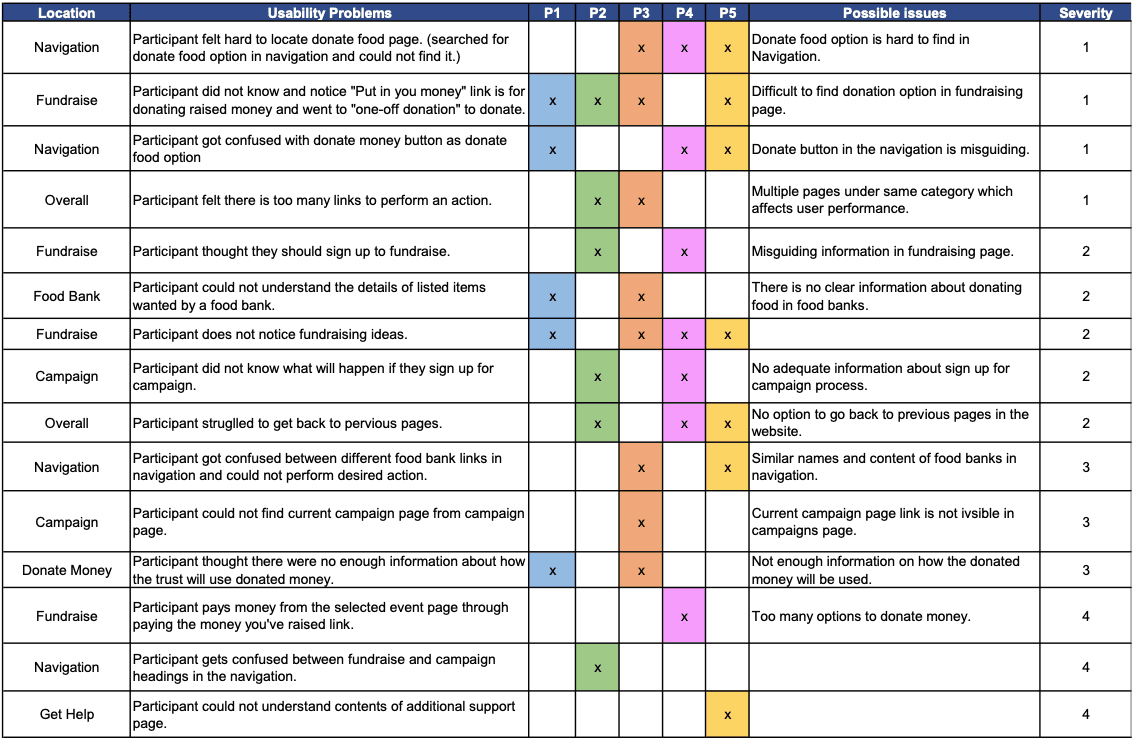
  1. Rainbow Spreadsheet Analysis

  1. Rainbow Spreadsheet Analysis

  1. Rainbow Spreadsheet Analysis

Categorised findings by severity level (1–4).

Categorised findings by severity level (1–4).

Categorised findings by severity level (1–4).

  1. Insight Mapping

  1. Insight Mapping

  1. Insight Mapping

Identified recurring patterns across participants.
Identified recurring patterns across participants.

Identified recurring patterns across participants.

Rainbow Spreadsheet

Rainbow Spreadsheet

Rainbow Spreadsheet

What We Discovered

What We Discovered

What We Discovered

A summary of the most impactful usability issues identified during testing.

A summary of the most impactful usability issues identified during testing.

A summary of the most impactful usability issues identified during testing.

Severity: Level 1

Severity: Level 1

Severity: Level 1

📌

📌

  1. Hard to Find “Donate Food” Page

  1. Hard to Find “Donate Food” Page

  1. Hard to Find “Donate Food” Page

Users struggled to locate the Donate Food section because similar donation links appeared across multiple menus.

Users struggled to locate the Donate Food section because similar donation links appeared across multiple menus.

“I can’t tell which of these donation pages is for food.”

“I can’t tell which of these donation pages is for food.”

“I can’t tell which of these donation pages is for food.”

Severity: Level 2

Severity: Level 2

Severity: Level 2

📌

📌

  1. Confusion Between ‘Donate Money’ and ‘Put in Your Money’

  1. Confusion Between ‘Donate Money’ and ‘Put in Your Money’

  1. Confusion Between ‘Donate Money’ and ‘Put in Your Money’

Participants assumed “one-off donation” meant donating raised money.

“Put in Your Money” was completely misunderstood.

Participants assumed “one-off donation” meant donating raised money.

“Put in Your Money” was completely misunderstood.

Participants assumed “one-off donation” meant donating raised money.

“Put in Your Money” was completely misunderstood.

“I’m not sure what ‘put in your money’ means… is this a personal donation?”

“I’m not sure what ‘put in your money’ means… is this a personal donation?”

“I’m not sure what ‘put in your money’ means… is this a personal donation?”

Severity: Level 3

Severity: Level 3

Severity: Level 3

📌

📌

  1. Fundraising Flow Is Unclear

Users thought they needed to sign up before donating raised money.

Users thought they needed to sign up before donating raised money.

Users thought they needed to sign up before donating raised money.

Severity: Level 3

Severity: Level 3

Severity: Level 3

📌

📌

  1. Difficult to Return to Previous Pages

Users frequently became “stuck” or uncertain of how to go back.

Users frequently became “stuck” or uncertain of how to go back.

Users frequently became “stuck” or uncertain of how to go back.

Severity: Level 4

Severity: Level 4

Severity: Level 4

📌

📌

  1. Food-Bank Item Requirements Were Unclear

Participants wanted simple lists and clearer instructions.

Participants wanted simple lists and clearer instructions.

Participants wanted simple lists and clearer instructions.

Where Users Got Stuck

Where Users Got Stuck

Where Users Got Stuck

A walkthrough of the most problematic journeys users attempted during the evaluation.

A walkthrough of the most problematic journeys users attempted during the evaluation.

A walkthrough of the most problematic journeys users attempted during the evaluation.

  1. Donating Food

  1. Donating Food

  • Couldn’t identify the correct donation link

  • Confused by overlapping navigation terminology

  • Multiple pages appeared to lead to the same place

  • Couldn’t identify the correct donation link

  • Confused by overlapping navigation terminology

  • Multiple pages appeared to lead to the same place

  • Couldn’t identify the correct donation link

  • Confused by overlapping navigation terminology

  • Multiple pages appeared to lead to the same place

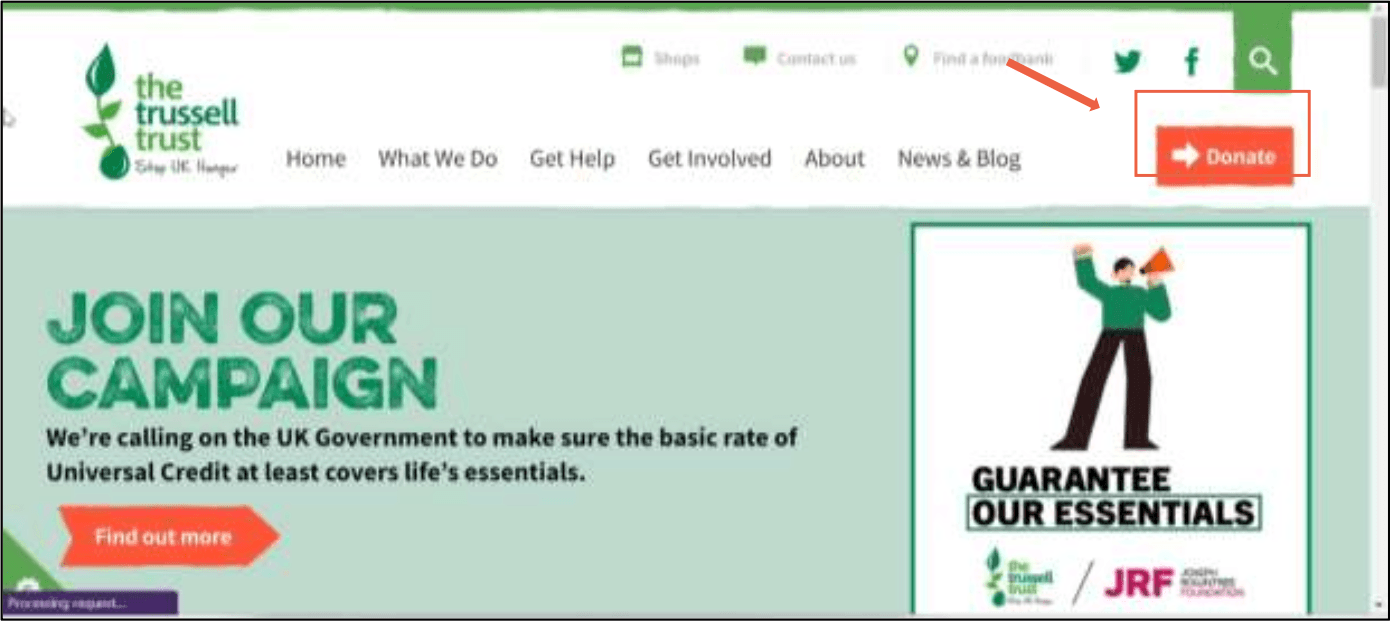
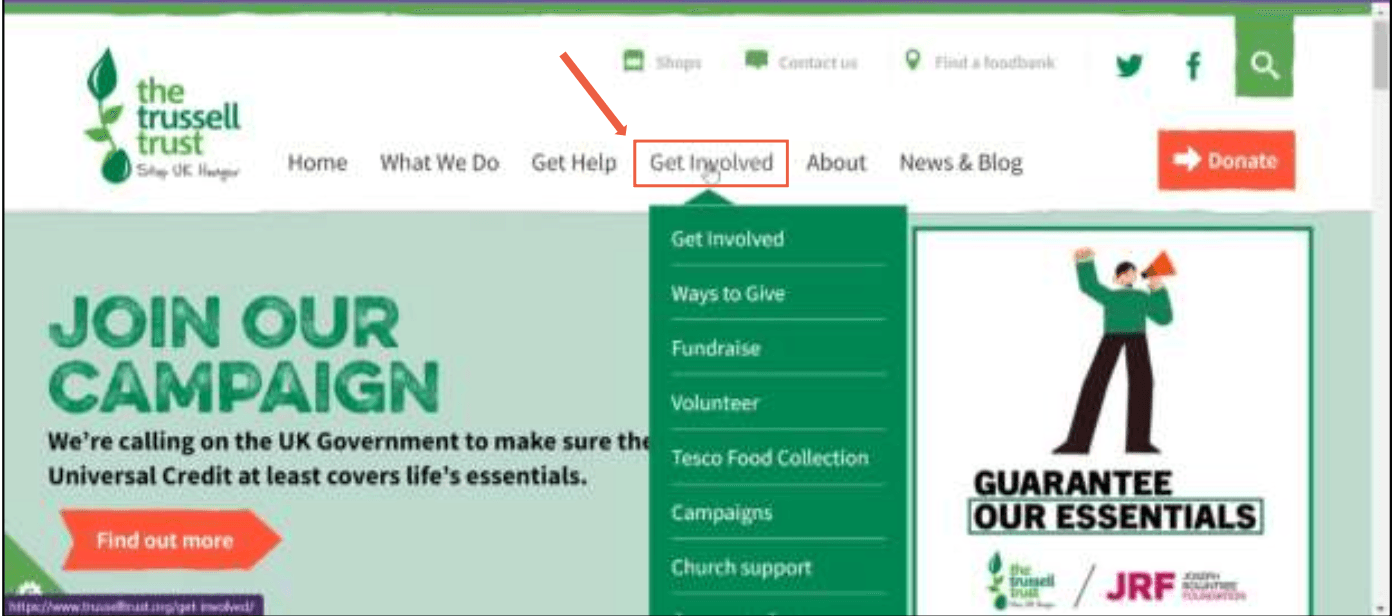
"4 similar donation links appear here simultaneously"

  1. Fundraising

  1. Fundraising

  • Users clicked “Donate Money” instead of “Put in Your Money”

  • Fundraising options were scattered across different pages

  • Unclear what the next steps were

  • Users clicked “Donate Money” instead of “Put in Your Money”

  • Fundraising options were scattered across different pages

  • Unclear what the next steps were

  • Users clicked “Donate Money” instead of “Put in Your Money”

  • Fundraising options were scattered across different pages

  • Unclear what the next steps were

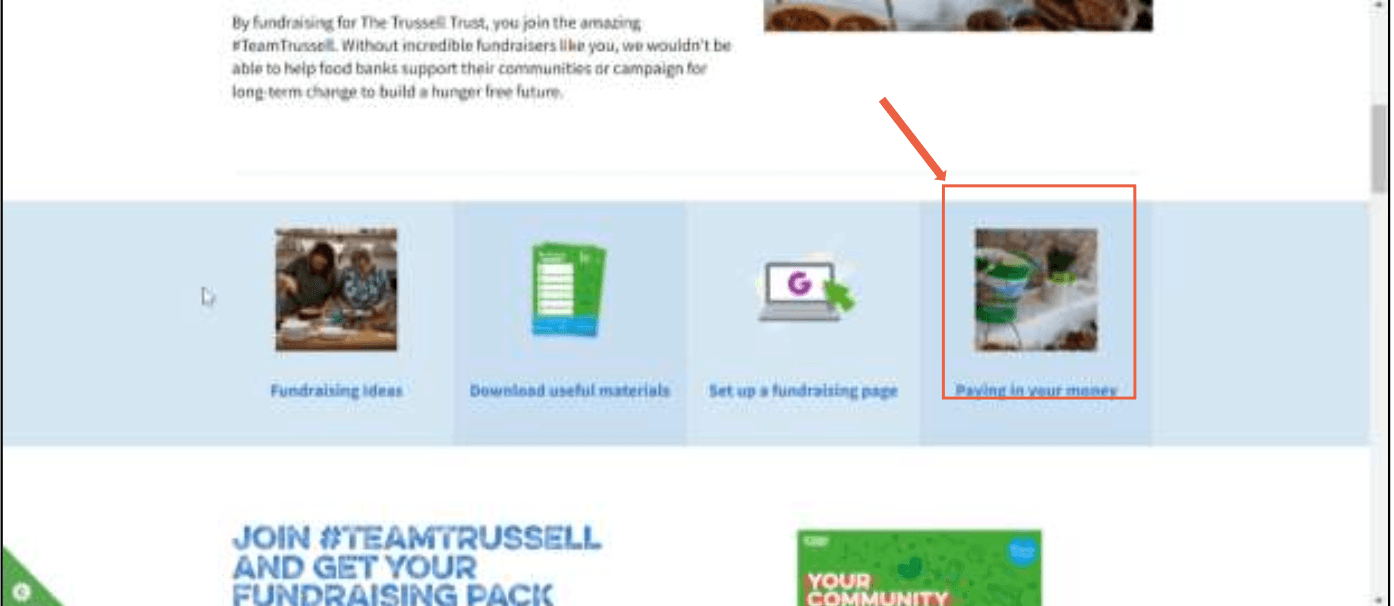
"Put in Your Money" button- Participants consistently misread this as a personal donation.

  1. Supporting the Charity

  1. Supporting the Charity

  • Campaign-related pages didn’t make the desired action clear

  • Users wanted a simple, guided path

  • Campaign-related pages didn’t make the desired action clear

  • Users wanted a simple, guided path

  • Campaign-related pages didn’t make the desired action clear

  • Users wanted a simple, guided path

Recommendations for Improvement

Recommendations for Improvement

Recommendations for Improvement

A set of actionable improvements aligned with UX best practices and WCAG standards.

A set of actionable improvements aligned with UX best practices and WCAG standards.

A set of actionable improvements aligned with UX best practices and WCAG standards.

Navigation Improvements

Navigation Improvements

Navigation Improvements

Before
After
"Donate Food" buried in sub-menu"Donate Food" in top-level navigation
4 overlapping donation linksSimplified to 2 clear categories
No visual hierarchy in menuClear labels with supporting descriptions

Clarity & Wording Fixes

Clarity & Wording Fixes

Clarity & Wording Fixes

Before
After
"Put in Your Money""Donate Raised Funds"
"One-off donation" (ambiguous)"Give a personal donation"
No supporting text under optionsShort description under each donation type

User Flow Improvements

User Flow Improvements

User Flow Improvements

Before
After
Non-linear donation journeySimple step-by-step linear flow
No breadcrumbsBreadcrumb navigation added throughout
Food Bank Finder hard to locateProminently linked from homepage

Impact at a Glance

Impact at a Glance

Impact at a Glance

56%

56%

56%

Completed successfully

Completed successfully

Completed successfully

31%

31%

31%

Completed with difficulty

Completed with difficulty

Completed with difficulty

13%

13%

13%

Failed

Failed

Failed

Top issues were addressed through clear recommendations and simplified flows.

Top issues were addressed through clear recommendations and simplified flows.

Task
Success
With Difficulty
Failed
Donate Food 40%40%20%
Donate Money80%20%0%
Find Fundraising Ideas60%20%20%
Support the Charity40%40%20%

Participant Feedback:

Participant Feedback:

“I want to donate food, but I genuinely don’t know where to click.”

Users struggled to locate the Donate Food section because similar donation links appeared across multiple menus.

“I want to donate food, but I genuinely don’t know where to click.”

“Why are there so many donation pages?”

Users struggled to locate the Donate Food section because similar donation links appeared across multiple menus.

“Why are there so many donation pages?”

“I thought this button was for something else.”

Users struggled to locate the Donate Food section because similar donation links appeared across multiple menus.

“I thought this button was for something else.”

Final Thoughts

Final Thoughts

Final Thoughts

This project taught me how even visually strong websites can fail users when task pathways aren't clear. It sharpened my ability to evaluate, synthesise, and communicate usability issues in ways that teams can act on, not just read.

It also reinforced something I'll carry into every project:

Clarity is not optional - it's essential, especially when people want to do good.

This project taught me how even visually strong websites can fail users when task pathways aren't clear. It sharpened my ability to evaluate, synthesise, and communicate usability issues in ways that teams can act on, not just read.

It also reinforced something I'll carry into every project:

Clarity is not optional - it's essential, especially when people want to do good.

This project taught me how even visually strong websites can fail users when task pathways aren't clear. It sharpened my ability to evaluate, synthesise, and communicate usability issues in ways that teams can act on, not just read.

It also reinforced something I'll carry into every project:

Clarity is not optional - it's essential, especially when people want to do good.

💛

💛

💛

Thanks for your time!

Thanks for your time!

Thanks for your time!

→ View next project

→ View next project

TIMIE

TIMIE

TIMIE

©2026AKSHAYA

Go Back To Top

©2026AKSHAYA

Go Back To Top

©2026AKSHAYA

Go Back To Top

©2026AKSHAYA

Go Back To Top